✨ Try our app free — just sign up to get started ✨

No credit card needed. Create your cover in minutes.

Built for self-publishers

Stop getting KDP rejections on your book covers

CoverLab Pro automatically calculates your exact spine width, trim size, and bleed — so your paperback, hardcover, and eBook covers pass Amazon's checks the first time.

$4.99 per cover · No subscription · Design free, pay only to export

Already rejected? Fix yours in 5 minutes →

✓ No design skills needed ✓ Works in browser ✓ No AI, no subscription

Design free. One credit unlocks a whole cover: download it as often as you need, in every format.

300DPI Export
16Trim Sizes
5Hardcover Sizes
How it works

Three steps from your artwork to a file KDP accepts.

1

Enter your book's details

Trim size, page count, paper and binding. The spine and full cover size are worked out for you.

2

Add your artwork and text

Upload your front cover, then add the spine, back cover blurb and author bio with KDP's guides on screen.

3

Check and export

A checklist flags size, resolution and safe-zone problems. Export a print-ready PDF for $4.99.

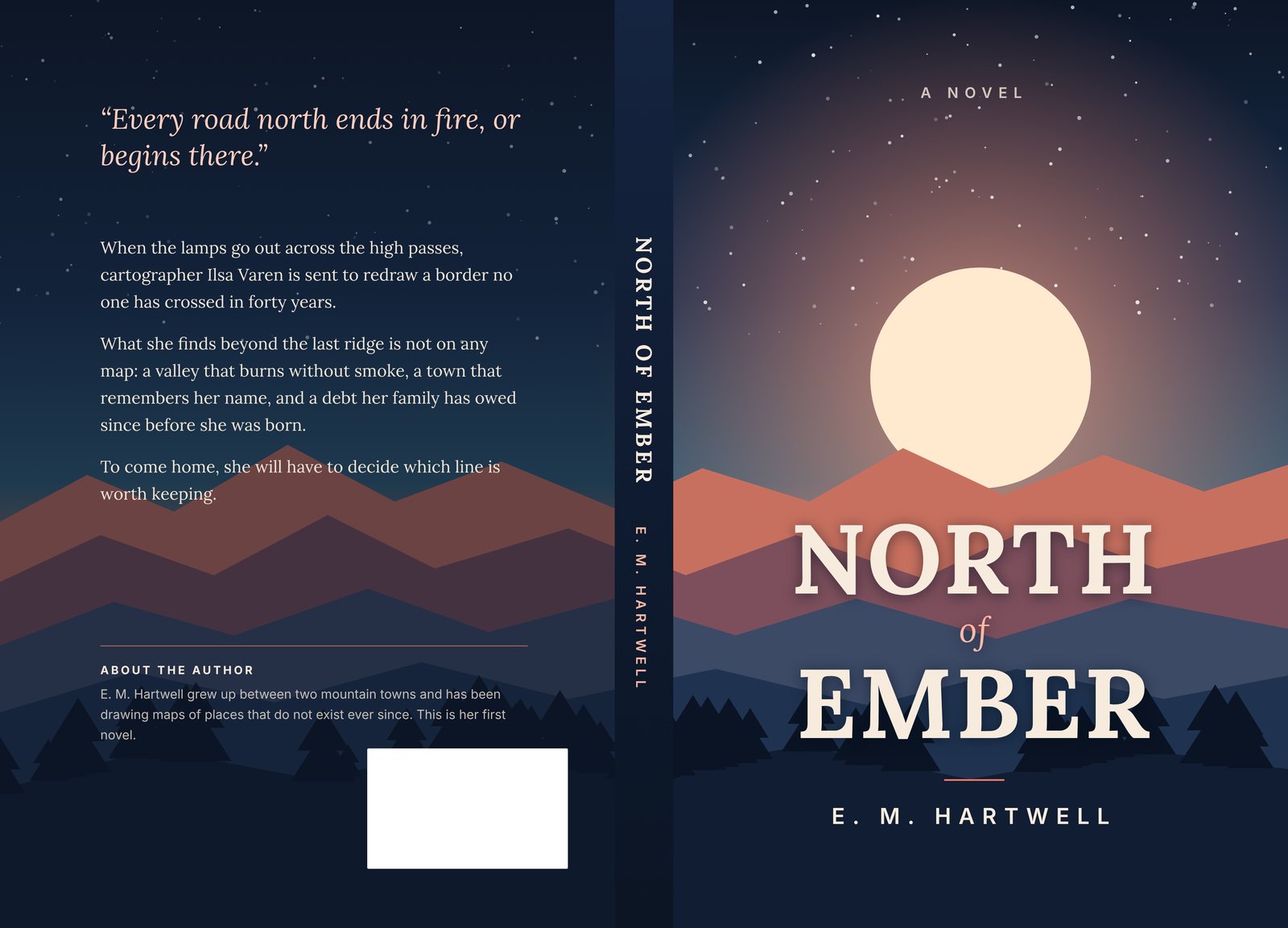
A full wraparound paperback cover: back cover, spine and front cover in one file BackSpineFront
A sample cover: back, spine and front in one print-ready file, sized for a 6 × 9 in paperback with 260 pages.

Checked against Amazon's own cover calculator

Paperback · 6 × 9 in · 100 pages
Spine 0.225"
Cover 12.475" × 9.25"

White paper, with bleed. The same figures Amazon's calculator gives.

Hardcover · 6 × 9 in · 300 pages
Spine 0.865"
Cover 14.439" × 10.417"

Wrap, hinge and board included. The same figures Amazon's calculator gives.

Your book
16 paperback sizes
5 hardcover sizes

Enter your trim size and page count and compare the numbers yourself with the free spine calculator.

Free KDP Resources

📐

Spine Width Calculator

Enter your page count and paper type to get exact spine measurements for any KDP paperback or hardcover.

📏

KDP Cover Size Guide

Complete reference for all Amazon KDP paperback and hardcover trim sizes with bleed specs and paper types.

💡

Cover Design FAQ

Answers to common questions about KDP cover requirements, file formats, and design tips.

🛠️

KDP Cover Rejected? 8 Fixes

The most common reasons Amazon rejects covers and exactly how to fix each one.

🔍

KDP Keyword Research Tool

Find what readers are searching for on Amazon. Organize keywords into KDP's 7 keyword slots and export.

💰

KDP Royalty Calculator

Calculate printing costs, minimum price, and profit per sale for paperback, hardcover, and ebook.

📄

Page Count Calculator

Turn your word count into an estimated page count and spine width.

🖼️

Image Size Checker

Check if your image is big enough to print as a cover at 300 DPI.

Articles & Guides

📏

Cover Size Doesn't Match?

What KDP's Expected and Submitted sizes mean, and how to fix your cover.

📐

KDP Cover Dimensions Guide

Exact pixel sizes, bleed specs, and spine width formulas for every KDP trim size.

📝

How to Use Kindle Create

Step-by-step guide to formatting your book interior for KDP publishing.

💵

KDP Printing Costs Explained

Exact printing costs for paperback and hardcover by page count, ink type, and marketplace.

📕

KDP Hardcover & Case Laminate

Board overhang, hinge channel, and cover dimensions for KDP hardcover books.

📊

Paperback vs Hardcover on KDP

Compare costs, royalties, and cover requirements to decide which format to publish.

📏

Best Trim Size for KDP

Compare all 16 trim sizes by genre, printing cost, and reader expectations.

⚔️

CoverLab Pro vs Canva

Why a KDP-specific tool beats general design tools for book covers.

⚔️

CoverLab Pro vs KDP Cover Creator

How CoverLab Pro compares to Amazon's built-in free cover tool.

⚔️

CoverLab Pro vs BookCoversLab

Feature and pricing comparison with the closest direct competitor.

⚔️

CoverLab Pro vs KDPEasy

Price per cover and what is included, side by side.

⚔️

CoverLab Pro vs BookCovers.pro

Price per cover and what is included, side by side.

How pricing works

New: one credit = one finished cover

Each credit now unlocks a whole cover in every format (PNG, PDF, JPEG and TIFF), and you can download it as often as you need for 30 days, even after fixing a typo or changing the page count. Before, every file you exported used a credit. A paperback and a hardcover of the same book count as two covers. Already have credits? Each one now covers a whole cover too.

1 cover
$4.99
All formats, unlimited downloads
5 covers
$14.99
$3 per cover
20 covers
$39.99
$2 per cover

Designing is free. No subscription, and credits never expire. See full pricing →

Frequently Asked Questions

❓ Do I need design experience?
No! CoverLab is built for non-designers. Upload your images, add text, and export — we handle all the technical KDP requirements automatically.
❓ Will my covers pass Amazon KDP's checks?
That's what it's built for. Cover sizes match Amazon's own cover calculator for both paperback and hardcover (case laminate), exports are 300 DPI, and the app checks your text, barcode area and image resolution before you export.
❓ What file formats can I export?
You can export in PDF, PNG, JPEG, and TIFF at 300 DPI. The PDF is the file you upload to KDP for a paperback or hardcover: one page with the back cover, spine and front cover. The PNG is the same full cover as an image, handy as a proof or for other printers. JPEG and TIFF are the front cover only, for your Kindle eBook; KDP takes either.
❓ Is there a subscription?
No. Designing is free. You buy cover credits once, and each credit unlocks a whole cover in every format, and you can download it as often as you need for 30 days. Credits never expire, and there are no hidden fees or commitments.